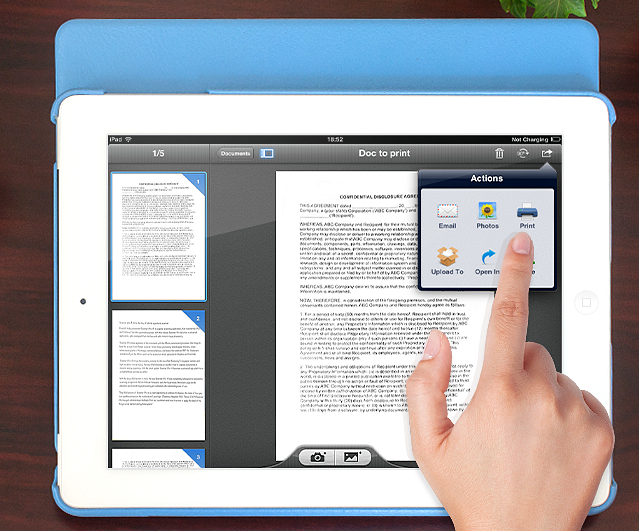
Have you ever been on the road and wish you could scan a document?
Or in a meeting and needed to share a hard copy document?
However, your scanner was back in your office…
Today, I want to show you an easy solution.
My iPad has replaced many devices and one of those is a traditional document scanner.
Scanning Documents With Your iPad
I was recently in a business situation where we needed to execute an non-disclosure agreement.
Instead of faxing documents back-and-forth for signature, we scanned the documents (we were given hard copies only). We then emailed them to the remote participants who printed, signed, and sent them back.
This sounds like a lot of work.
However all of this was done in less than 5 minutes via our iPads and using a powerful app called Scanner Pro.
Scanner Pro by Readdle
There are several iOS apps out there that will let you snap photos of your documents.
However, my favorite scanning app for iPad is Scanner Pro by Readdle.
I use it all the time on my iPad. The improved camera on the new iPad makes for a great document scanner.
And Scanner Pro makes it simple to scan items ranging from simple sheets to multi-page multi-format documents.
Using your iPad with Scanner Pro is better than a traditional scanner in many regards. It is extremely fast and can be carried with you no matter where you are.
It is perfect for scanning items that you wouldn’t or couldn’t put through a traditional scanner.
Some of Scanner Pro’s Powerful Features:
- Multi-page/Multi-format – It is simple to scan multi-page documents. It doesn’t matter if they are portrait or landscape, and the app makes it easy to rearrange pages within the document.
- PDF – Share scanned docs in standard PDF format or JPG if you prefer images.
- Folders – You can create document folders to keep your document library neat and organized. I keep different areas for work, home, and TMN.
- iPhone and iPad – Scanner Pro is a universal app that works on both iPad and iPhone. (Meaning you only have to purchase it once.)
- Share Almost Anywhere – Once you scan your documents, you can share or save them in many different services including Dropbox, Email, Google Docs and more.
- Syncs Via iCloud – Scanner Pro syncs between your devices via iCloud. So, if you scan a document via your iPad and later want to access if from your iPhone, it is already there.
httpvh://youtu.be/qkMMT7E7BRA
If you cannot see the video, click here to view it.
A Scanner In Your Bag (or Pocket)
With Scanner Pro and your iPad you can have a scanner with you no matter where you go.
(And with the iPhone version you can even have a scanner in your pocket…)
So, the next time you find yourself needing to quickly scan a document on-the-go simply grab your iPad.
If you aren’t already using your iPad as a scanner, you need to check out Scanner Pro in the App Store.
Question: Do you use your iPad to scan documents on-the-go? What is your most creative use?
Can you share a full details of this method.
Which is the best Fabrication work in Kota, Rajasthan?
Fabrication is the process of constructing products by combining typically standardized parts using one or more individual processes.
Why is Fabrication Process important?
Our economy relies on metal fabrication processes. Without it, we wouldn’t be able to run our electrical systems or create the parts that keep our houses, kitchens, businesses, computers and vehicles operational.
Find the best Fabrication work price!
Manufacturer of Fabrication Work – Steel Fabrication, Industrial Fabrication, SS Fabrication and Custom Fabrication offered by Fabironexports.
Fabironexports is a company that provides custom fabrication services for industrial, commercial, and residential projects.
Fabironexports is a company that provides custom fabrication services for industrial, commercial, and residential projects. They have been in the industry for over 30 years and have seen their fair share of changes in the industry. They are one of the most reliable companies in the industry with an A+ rating from BBB and 100% customer satisfaction.
For more information visit on https://fabironexports.com/Fabrication.php
I am Maurish Paul, working as the senior seo executive geekscan company. I am managing all the seo activities of the company. For information you can visit our website and get the information.Book Your Post is a Professional Informational Platform. Here we will provide you only interesting content, which you will like very much. We’re dedicated to providing you the best of Informational, with a focus on dependability and Technology. We’re working to turn our passion for Informational into a booming online website. We hope you enjoy our Informational as much as we enjoy offering them to you.I will keep posting more important posts on my Website for all of you. Please give your support and love.
https://bookyourpost.co.uk/top-10-pandora-alternatives-for-android-in-2022/
Thanks for the valuable content for more information please visit my site cricut.com/setup so you get more information about cricut design.
Glass and Glazing Work from Rajasthan India
Fabiron Exports is a best option for your ACP Cladding, ACP Fabrication, ACP Structural Works, Glass and Glazing Work from Jaipur Rajasthan India We are the best ACP Fabricators in Jaipur.
Once two people from the village decided to go to the city and earn money. After going to the city for a few days, doing small things here and there, both of them accumulated some money and then started their own business with that money. Both the business continued. Within two years, both of them made a lot of progress.