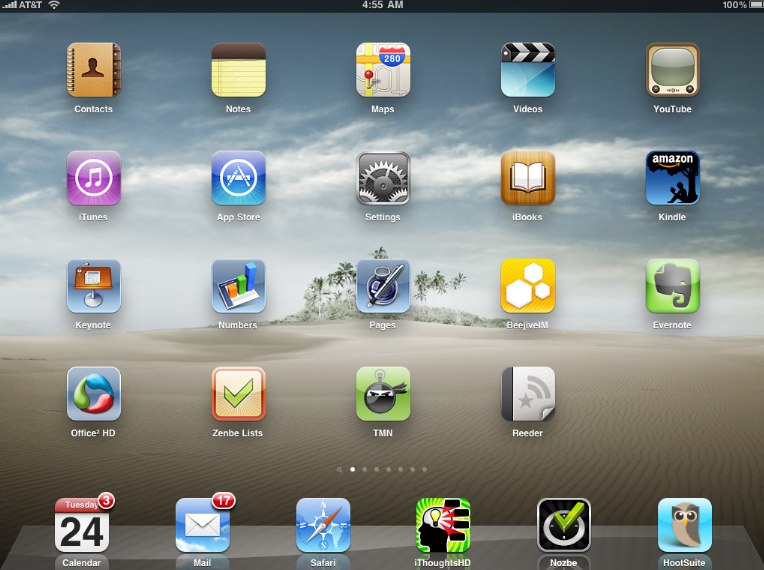
Do you have have an iPad?
Do you use it for work? Do you use it for fun? Or both?
There has been interesting debate lately as to whether the iPad is more for consumption or for creation. In other words, is it more for accessing media? (Surfing the web, watching movies, reading books) Or can it truly be used to create content? (Do work, create documents, etc.)
I do believe that at the current time, it is better at consumption. Much of this is by design and also due to a lack of productivity apps. However, the apps are catching up rapidly. And it seems almost daily there is a new use for the iPad.
Today, I thought I would share some of the apps that I use to “get work done” on my iPad.
How I Use the iPad as My Laptop
Perhaps, the biggest computing shift for me is carrying the iPad. At work, I used to lug my laptop around the building to meetings and more. Now, I find that my laptop lives on my desk. I bring the iPad instead and most of the time forget that I am carrying it. In meetings, it is very unobtrusive. In its black case, most people do not even recognize it sitting on a meeting table.
Here are just a few of the apps and uses I have for my iPad at the current time:
Calendar/Email

Of the built-in apps, I think that the calendar and email clients are wonderful. They are truly a step above what is available on most mobile devices. The iPad’s increased screen size makes it possible to see views that are more usable that those on any smartphone.
I love the calendar app. It is great being able to see a full screen weekly or monthly view. (See pic above). I often find myself showing the calendar to co-workers via the iPad screen when planning an appointment.
Mindmapping: iThoughts HD

My friends and colleagues know that I love to use mindmapping techniques to brainstorm new ideas and projects.
There are several mindmapping apps for the iPad. Again, with the increased real estate of the iPad screen, these apps are truly functional. I was not a fan of the iPhone versions because the screen size limited your ability to see the big picture, which is what mindmapping is all about.
Currently, I am using iThoughts HD. It has the simplest and most intuitive interface I have found on the iPad.
Some of the things I like:
- Auto Topic Organization – I like my mindmap to auto layout the topics in an orderly fashion. You can turn this on for each map in the settings menu.
- Right Map Layout – This is a personal preference, but I prefer maps to be “Right Maps” meaning all the topics branch off the right side. For me, this makes them more readable. Sometimes on a large project I will go with a multi-sided map.
- Export/Save options – iThoughts HD has many save and export options. It supports multiple file formats and can send maps via email, Dropbox and more.
iThoughts HD ($7.99) in the app store.
Document Creation/Editing: Office2 HD

I use both Keynote and Pages on the iPad. And currently, there are no apps that are as polished as Apple’s own document tools. However, where Apple’s apps fall short is in the document management and sharing areas. It is not convenient to get documents off the iPad from Pages, Keynote, or Numbers. Sure, you can email them, but with the exception of Pages, you are limited to the Apple doc formats. (Pages will export Word format). Until Apple updates their apps for better document sharing and formats, there are several great apps out there.
I am currently using Office2 HD. It has basic editors for documents and spreadsheets. However, where it shines is in document management and sharing.
Office2 HD works with your Google Docs, MobileMe, and Dropbox accounts. It is very powerful. As far as I know, it is still the only app that can access Google Docs…edit them…and re-save them to the cloud. Very impressive.
Office2 HD ($7.99) in the app store.
Notes/Document Filing: Evernote

If you are not using Evernote to manage your digital note storage, then you need to try it. As I wrote yesterday, I still use a Moleskine notebook for my handwritten notes. But, for everything else, there is Evernote.
It is an amazing system for collecting digital notes, references, whatever.
And the iPad app really shines. You can get to your notes from anywhere. The interface lets you search for individual notes, or as in the picture above, browse your Evernote notebooks.
The best part? The basic Evernote account and even the app are free.
Evernote (Free) in the app store.
How Do You Use Your iPad?
The use of the iPad is still evolving. It still has a way to go in the area of document management and cloud access. But, this is changing quickly as app development catches up with the device.
I predict that the iPad will be used more and more in the workplace in near future.
How do you use the iPad for work? What are your best uses and apps? Share below.
Related Posts:
How the iPad Replaced My Laptop in 30 Days
Is there some secret way to sync Google Calendar to the iPad Built in Calendar? We’ve started using Pocket Informant b/c it can sync from Google Calendar.
Craig,
Being very frugal about spending money, i was looking for good ways to better manage my chaotic lifestyle with the aid of useful apps.
I found one evernote very useful. Thanks.
I also found this site very useful.
Craig, fantastic post. I’m a huge fan of using the iPad for work. I’m going to check out Office 2HD and I’ll give Evernote a second look – wasn’t impressed when I first saw it, but I may have missed some things. I take all my notes in Paperdesk and use Popplet for mind mapping.
I use my iPad as my GTC center in addition to my mobile office. Here’s a look at how I do it:
http://cicciideas.com/?p=320
George,
Thanks for sharing. I will have to check out Paperdesk. Tried Popplet briefly, it wasn’t quite what I was expecting. May have to give it a 2nd look.
Will check out your site!
Vijay,
Yes, I hear you on the frugality part. Obviously, some of these apps can add up quickly. Hope you like Evernote.
Thanks for sharing!
Good question. I was just looking at this the other day. Think I have a reference on this.
Let me look and I will post it.
I admire your enthusiasm, and of course I agree that iPad can be used for getting things done. But maybe I’m just too lazy — I use it mainly for entertainment, though of course I use also e-mail and calendar functions;)
If you are a website designer I highly recommend iMockups for quick wire framing.
Everyone should use Reeder for their RSS feeds. If you’d asked me two months ago if I could possibly read all the blogs I subscribe to, I would have said no. But Reeder allows me to go through them all at warp speed, bookmark, tweet, or email the ones I want to share, and mark as read.
Gini,
I love Reeder for iPad! Great way to keep up with your RSS feeds…and save time from surfing the web. 🙂
For those unfamiliar with Reeder for iPad, I did a quick review here:
https://timemanagementninja.com/2010/06/review-the-wow-of-reeder-news-app-for-ipad/
I don’t do much web design, but I too have heard good things about iMockups. Will have to look at it in terms of software development that I am involved in.
And there is nothing wrong with that. 🙂
I too love the iPad for entertainment when I am not working. There are some great games and apps out there. And of course, it is great for movies and live streaming video.
What transformed the iPad into a creation machine for me is the use of an external bluetooth keyboard.
I find input too slow on the screen keyboard. This allow me to compose email, blog articles, chapters of my book, and client proposals.
Thanks for the great post!
Love the idea of consumption vs. creation. As a fellow blogger I’ve been writing posts in Simplenote, and then copy/pasting text into WordPress. I’m all for a better way and will definitely give Office2 a try. Evernote can easily become dumping ground for me that needs constant upkeep and organization — I’d love to hear other’s systems.
Jeff,
Check out “Elements – Dropbox Powered Text Editor” for both iPad and iPhone. Was going to do a quick write-up on it soon.
Sharp, simple text editor…good for blog posts and ideas…
And the killer part of the app is that it beautifully syncs with Dropbox. (If you couldn’t tell from its extended app name…)
So, you can get to your text files form your iPad, iPhone, online, or any computer with Dropbox.
I started a quick blog post idea on my iPhone while at the gym, and then worked on it later on my iPad.
It costs $4.99 in the app store, which is not cheap for what it does…but it does it well. 🙂
Paul,
I too sometimes use an external keyboard if I am doing a lot of typing. I have the keyboard dock vs. the external bluetooth keyboard. Both work well and each has its pros and cons.
Love to hear why you picked one over the other.
Very nice tips to use iPad for work. I bought iPad keeping the entertainment factor in mind. so, I use it to watch movies or play games. I don’t use it for work as of now but i think I will try. Thanks for posting.
Very nice tips to use iPad for work. I bought iPad keeping the entertainment factor in mind. so, I use it to watch movies or play games. I don’t use it for work as of now but i think I will try. Thanks for posting.
I use Calengoo
I use Calengoo
I’ve been happy with using my iPad in the office ever since I read the iPad for Work Guide/PDF at OSInsights.com. I didn’t really know all of the tips and tricks to using it for work, and really just played Angry Birds on airplanes. I do wish it had a physical keyboard, because that is its biggest weakness, to me. For important meeting, I still lug my laptop around so that I can send follow up emails after meetings.
I’ve been happy with using my iPad in the office ever since I read the iPad for Work Guide/PDF at OSInsights.com. I didn’t really know all of the tips and tricks to using it for work, and really just played Angry Birds on airplanes. I do wish it had a physical keyboard, because that is its biggest weakness, to me. For important meeting, I still lug my laptop around so that I can send follow up emails after meetings.
Thanks for helping people. Keep it up.
Hire Iphone Developers In USA
Hey Author!!
I must say that you have shared very unique and productive tips shared that how to use iPad effectively.
Thanks from mobile application development company
Great…
Thank you for sharing very unique and productive tips.
RipenApps Technologies
Digital Marketing Tutorials and other Web related tutorials for beginners .
Hey
First off, congratulations on this post.
We appreciate your sharing this informative article. Your information is beneficial and essential for everyone. How I Use My iPad to Get Work Done way for businesses to reach their target audience and show them the most recent updates and offers. We all have to start somewhere, and your article is perfect.
Great Share, and thanks for the mention here. Wow……
How cool is that
NogaTech shares this post now. I want all those new bloggers to see that if they don’t already have an article, then they read now.